
AI has transformed the approach to the learning and research process, as well as writing and time management among students. AI is no longer merely a productivity tool; it’s an integral part of the study process in 2026. From homework, lecture notes, complex math problems, to presentations, the Best Free AI Tools for students can save hours each week.
However, here is the challenge!
Enter the term best free AI tools for students, and you’ll get hundreds of suggestions. A lot of lists give the same names without clarifying who each tool is best for and if the free version is really helpful.
This guide is special.
Rather than just providing a list of popular apps, I’ve made a list of the best free AI tools for students based on their actual uses in the classroom, free plan limitations, ease of use, and what they truly excel at. It will help you find the right tools if you want to study smarter, without having to spend money on costly subscriptions.
Why Best Free AI Tools for Students Matter
The use of AI is good for students. Students can benefit from AI.
AI isn’t a way to get rid of learning, it’s just to eliminate the repetitive tasks.
Free AI Tools can assist students in the following ways:
- Summarize lengthy textbooks
- Explain difficult concepts
- Generate study notes
- Improve essays
- Create presentations
- Solve coding problems
- Organize research
- Manage study schedules
The essential part is to use AI as a learning assistant, rather than a replacement for assignments.
ChatGPT – Best Free AI Tool For Students
Best for: Writing, coding, explanations, brainstorming
One of the most versatile Best Free AI tools for students is ChatGPT.
It can make sense of concepts in simple language, even if you’re writing an essay, learning Python, generating images, preparing for exams, or just trying to make sense of complicated theories.
What makes it stand out?
- Describes challenging concepts in a gradual way
- Generates quiz questions
- Helps write reports
- Helps to run coding tasks
- Creates study plans
- Brainstorms project ideas
Pros
- Easy to use
- Excellent writing assistant
- Supports coding
- Strong reasoning abilities
Cons
- Free usage limits during peak times
- Always verify facts before submitting assignments
Best for: University students, researchers, programmers, writers
Google Gemini – Best Free AI Tool for Google Workspace Users
Google Gemini – Best for Google Workspace Users
If you work with Google Docs, Google Drive, Gmail or Google Classroom, Gemini will seamlessly fit into your existing workflow. It has best value in comprehending information from Google’s ecosystem and assisting in writing and research.
Ideal uses
- Draft assignments
- Summarize PDFs
- Create spreadsheets
- Brainstorm project ideas
- Translate content
Pros
- Excellent Google integration
- Fast responses
- Strong multimodal capabilities
Cons
There are some advanced features, which can only be used with paid plans.
Perplexity AI – Best Research Assistant
Best for: Academic research with sources.
Perplexity isn’t just an AI research partner, though; it also includes citations right in its answers, so it’s one of the most reliable out there. Students don’t need to spend 30 minutes visiting several sites – they can easily access credible sources and read the original sources.
Best features
- Real-time web search
- Source citations
- Follow-up questions
- Research summaries
Great for
- Literature reviews
- Research papers
- Current events
- Finding academic resources
Grammarly – Best AI Writing Assistant
Best for: Proofreading, enhancing academic writing
Grammarly enhances clarity, tone, spelling, punctuation and readability prior to submission.
It works inside:
- Google Docs
- Microsoft Word
- Browser
- Social media
Free version includes
- Grammar correction
- Spelling suggestions
- Punctuation fixes
- Tone detection
Perfect before submitting assignments.
Canva AI – Best for Presentations
Use for: Slides, infographics, posters
Each semester students produce a presentation. Canva AI can create presentation ideas and concepts, icons, and images in just a few minutes, instead of spending hours designing slides.
Popular features
- Magic Design
- AI image generation
- Presentation templates
- Resume builder
- Infographics
This is particularly helpful in cases of group projects where presentation is a factor.
Notion AI – Best for Organizing Study Notes
Ideal for: Work and recording notes
A lot of students have trouble with disorganized notes.
Notion Combines:
- Notes
- To-do lists
- Databases
- Calendar
- AI writing
into one workspace.
An entire semester can be organized with one dashboard.
Great for
- Assignment tracking
- Lecture notes
- Project planning
- Revision schedules
7. Microsoft Copilot – Best for Microsoft Office
Best for: Word, Excel, PowerPoint
Copilot can greatly enhance productivity, especially if your university uses Microsoft Office.
Examples include:
- Creating PowerPoint slides
- Summarizing Word documents
- Writing emails
- Explaining Excel formulas
It will be particularly convenient for students with a Microsoft account.
Claude – Best free AI Tool for Reading Long Documents
Best for: Summarizing PDFs and papers.
Claude is very good at processing long documents. Students can upload a 100-page research paper and Claude will read it, and then provide the student with a summary of the key concepts.
- Summarize chapters
- Explain difficult sections
- Extract key findings
- Compare arguments
This will make revision much quicker before exams.
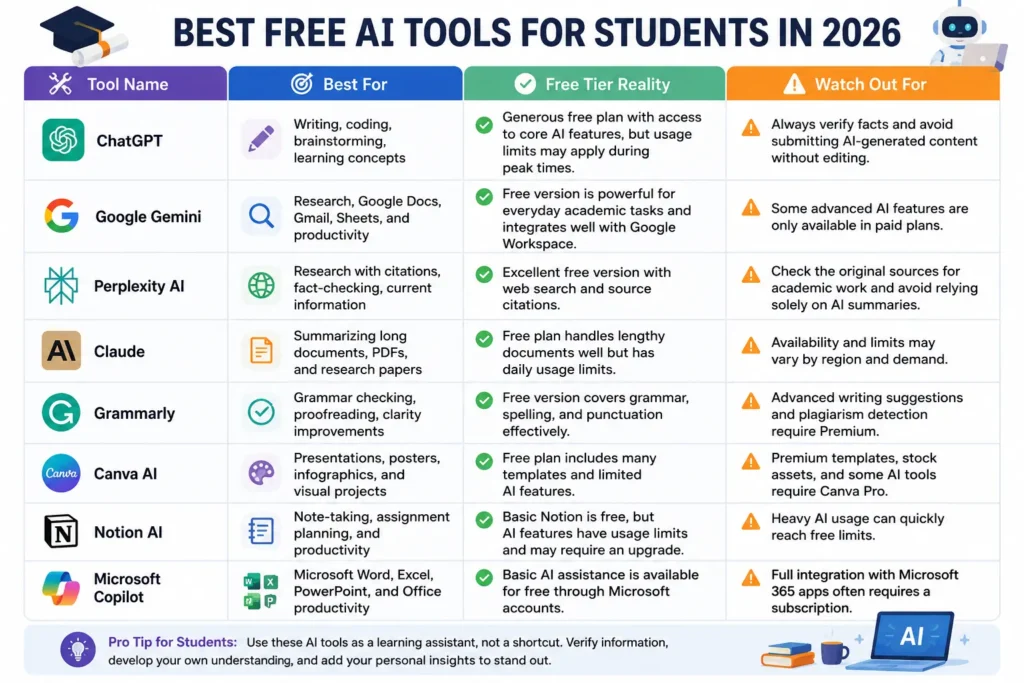
Best Free AI Tools for Students: Quick Comparison
| Tool Name | Best For | Free Tier Reality | Watch Out For |
| ChatGPT | Writing, coding, brainstorming, learning concepts | Generous free plan with access to core AI features | Can sound confident while being wrong |
| Google Gemini | Research, Google Docs, Gmail, Sheets, and productivity | Free version is powerful for academic tasks and integrates well with Google Workspace. | Some advanced AI features are only available in paid plans. |
| Perplexity AI | Research with citations, fact-checking, current information | Excellent free version with web search and source citations. | Check the original sources for academic work and avoid relying solely on AI summaries. |
| Grammarly | Grammar checking, proofreading, clarity improvements | Free version covers grammar, spelling, and punctuation effectively. | Advanced writing suggestions and plagiarism detection require Premium. |
| Canva AI | Presentations, posters, infographics, and visual projects | Free plan includes many templates and limited AI features. | Premium templates, stock assets, and some AI tools require Canva Pro. |
| Notion AI | Note-taking, assignment planning, and productivity | Basic Notion is free, but AI features have usage limits and may require an upgrade. | Heavy AI usage can quickly reach free limits. |
| Microsoft Copilot | Microsoft Word, Excel, PowerPoint, and Office productivity | Basic AI assistance is available for free through Microsoft accounts. | Full integration with Microsoft 365 apps often requires a subscription. |
| Claude | Summarizing long documents, PDFs, and research papers | Free plan handles lengthy documents well but has daily usage limits. | Availability and limits may vary by region and demand. |
My Experience Using AI for Learning
We tried out a number of AI tools for writing, coding, research, and productivity, and found that none of them is perfect at all of these.
For example:
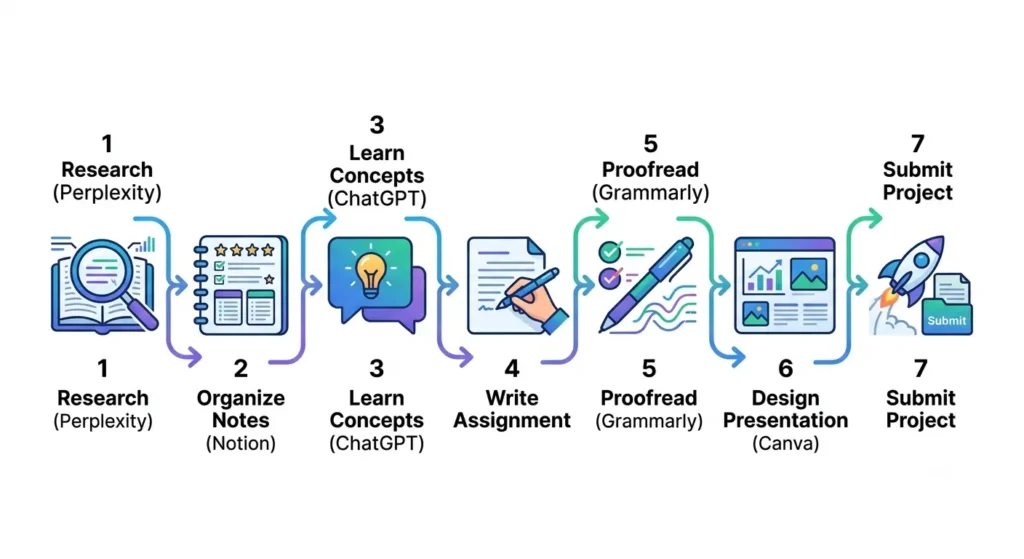
- When I need trustworthy sources, I turn to Perplexity.
- Use ChatGPT to clarify complex ideas or to generate ideas.
- Canva AI can help transform your project ideas into professional presentations.
- I check any document with Grammarly before submitting it.
Most of the productivity can be achieved by using these tools together and not just one of them. By understanding the strengths and weaknesses of various AI tools and identifying which ones work best for specific tasks, students can save a lot of time.
Tips for Using AI Ethically in School
AI is not about replacing learning, but about assisting it.
Here are some recommendations for best practices:
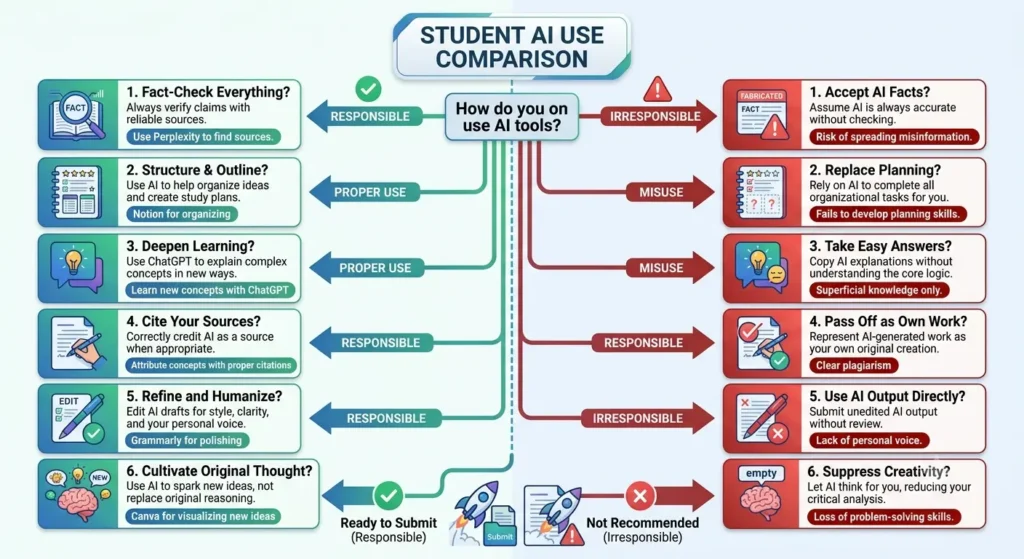
- Check facts generated by AI with reliable sources.
- Do not submit work that you created using AI without checking.
- Respect the Academic Integrity Policy of your school.
- Use AI to comprehend concepts rather than copy-paste answers.
- Include own analysis and examples in assignments.
The technology of AI can enable you to be a better learner when used responsibly and in the right manner.
Future of AI in Education
Next-generation AI tools are taking their next step from text generation.
There’s AI already in existence that can:
- Personalize study plans
- Generate interactive quizzes
- Describe diagrams and charts
- Analyze learning progress
- Offer real-time tutoring
- Support voice-based learning
As the technology progresses, and as these tools become more powerful, students educating themselves on how to use AI effectively will have a major edge in both classroom and careers.

Best Free AI Tools for Students FAQs
ChatGPT is one of the top free AI tools due to its ability to assist with writing, coding, brainstorming, learning, and much more on a variety of topics. If you’re doing research with citations, then Perplexity AI is also a great option.
Yes. There are several top-notch AI tools that have free plans with user limits. These free versions will do for most day-to-day school assignments.
Yes, AI can provide explanations, solve practice problems, outline ideas and enhance the writing. It is important to note, however, that students should always check information and adhere to their academic policies.
One good alternative is Perplexity AI, as it offers citations and links to sources to check information and further research.
Conclusion
The Best Free AI Tools for students are no longer mere productivity tools, they’re learning partners. AI Tools for Students can be used to complement rather than replace learning, from helping to write better essays and compose polished presentations, to organizing notes and conducting research.
The best way to do it is not to use one tool for all things. Instead, create a basic toolkit that works for you: Use ChatGPT to get explanations, Perplexity to research, Canva AI for presentations, Grammarly to edit your content and Notion AI to stay organized. You’ll save time, boost the quality of your assignments, and build skills that will last beyond the classroom by utilizing the power of these best free tools.